For solo founders and lean teams
Run marketing before you hire.
Plan launches, create social posts and draft customer replies in one AI workspace while you build the business.

A product launch in Roarix
Follow an example launch from the first draft to the calendar and customer inbox.
Supported publishing channelsFacebook PagesInstagram Business and CreatorThreads
What you do on launch week
Bring your offer and a product photo. Roarix prepares the plan and drafts so you can review the work in one place.
Brief the launch
Say what you’re launching, who it’s for, and when it goes live. Attach a product photo if you have one.
Review the drafts
Check the proposed posts and credit cost. Generate the drafts, then edit any images or captions that need work.
Approve the schedule
Check the final post, account and publish time. Roarix sends it to your connected account after you approve.
What happens if I edit an approved post?
Approval applies to the version you reviewed. If you need to change a scheduled caption, cancel its schedule first, then approve and schedule the updated post.
Keep up when the replies come in
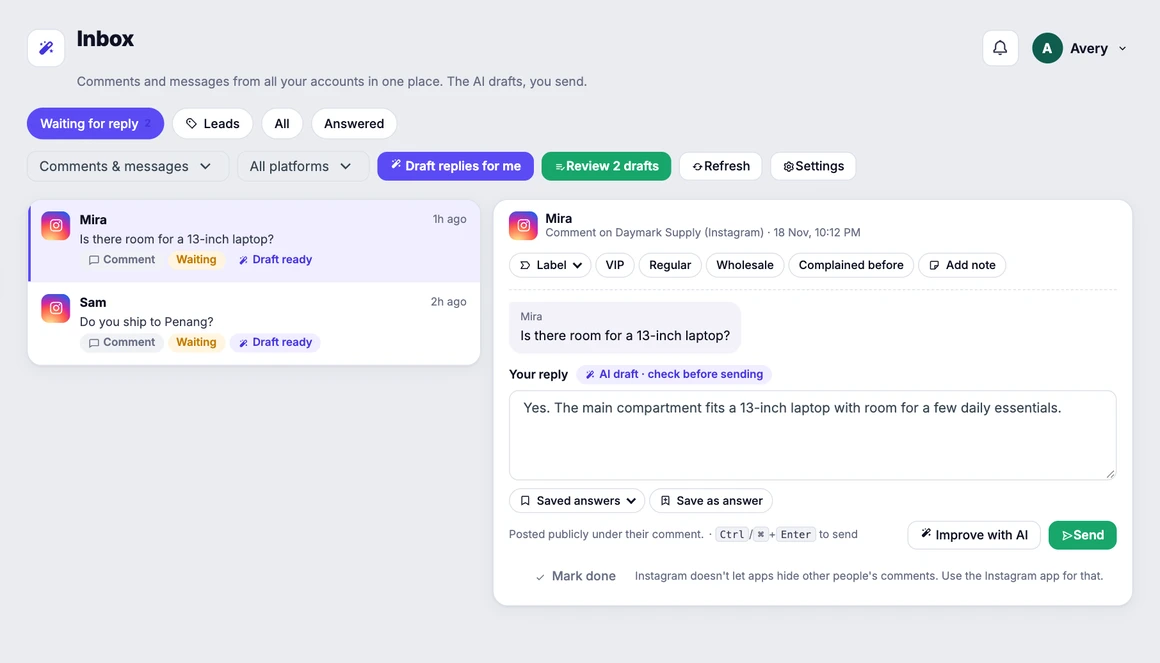
Check supported comments and messages in one inbox. Roarix can draft replies using details you’ve saved, such as delivery times or availability.
See inbox featuresDecide what to post next
Turn on the weekly report to see available reach, engagement and link clicks. Roarix can draft a follow-up within your credit budget.
Start with one campaign
Credits cover AI-generated images, videos, captions and reply drafts. Your plan includes a monthly allowance.
Frequently asked questions
Contact usCan I make a draft before connecting my accounts?
Yes. Plan a campaign and make a draft first. Connect an eligible social account when you’re ready to publish.
Which social accounts can I connect?
You can publish to Facebook Pages, Instagram Business and Creator accounts, and Threads profiles. Available post formats and inbox actions vary by platform.
Who decides what gets published?
You approve posts from the workspace before they go out. You also review and send draft replies yourself.
Can I check the credit cost first?
The campaign plan shows the total before you generate. You can also set an optional auto-approval limit for small generations.
Can I write posts in Bahasa Melayu?
Yes. Ask for captions in Bahasa Melayu, English, or both. Roarix can draft replies in the language customers use.